
Navigating the Future of Enterprise Print: Microsoft WPP and the Cloud Shift
Microsoft Windows Protected Print is retiring legacy print drivers. Here is what it means for your print environment, and how YSoft SAFEQ Cloud lets you adopt it while keeping pull printing and accounting.
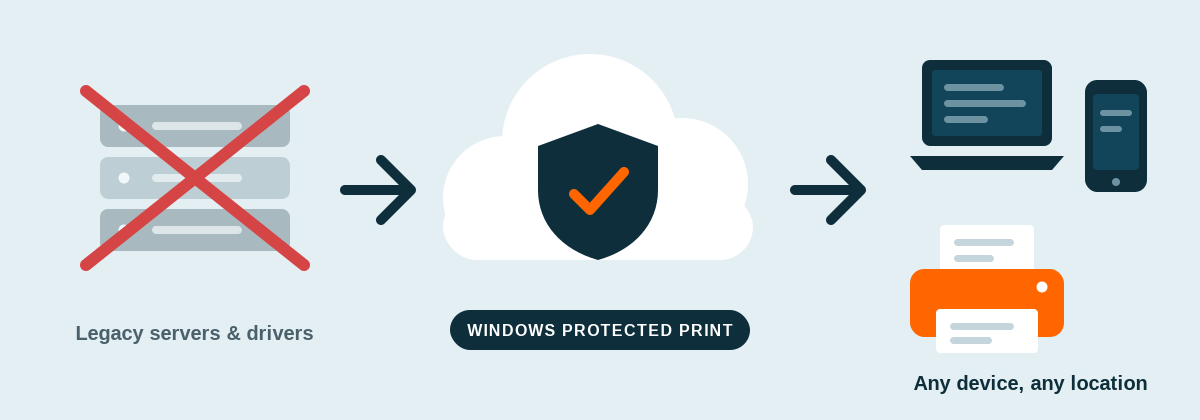
Introduction
Printing is the part of the IT estate most organisations stopped thinking about years ago. It sits on a local server, runs on vendor drivers, and mostly works. That is also why it has become a security problem, and why Microsoft is changing how Windows prints.
For decades, enterprise printing meant local print servers, long lists of queues and a different driver for every vendor. Hybrid work, the move away from on-premises domain controllers and a run of high-profile spooler vulnerabilities have made that model hard to defend and expensive to run.
This article explains what Windows Protected Print (WPP) changes, what it costs to ignore it, and how YSoft SAFEQ Cloud supports it. Taurine Software helps Australian organisations make the move.
What is Microsoft Windows Protected Print (WPP)?
Windows Protected Print (WPP) is Microsoft’s redesign of how Windows prints, with security as the main goal.
Until now, Windows printing has relied on third-party drivers loaded by the Print Spooler service. Those drivers need broad system permissions and are patched on each vendor’s own schedule, which made them a favourite target. PrintNightmare is the best-known example.
WPP changes how Windows handles print jobs:
- No third-party drivers: Windows stops loading vendor-supplied print drivers.
- Standard IPP printing: Printing uses the driverless Internet Printing Protocol (IPP) built into Windows.
- Tighter security: Print operations are isolated and encrypted, which shrinks the attack surface around the spooler.
- Fewer update problems: With printing handled by the operating system, Windows updates are less likely to break vendor driver setups.
The direction is clear: Microsoft wants printing on Windows to be driverless, standards-based and locked down.
Why print architecture is changing
WPP is one part of a wider change. Four things are pushing organisations away from the traditional print server.
1. Shift to zero-trust and serverless infrastructure
Many organisations are retiring on-premises servers and managing identity through Microsoft Entra ID (formerly Azure AD). A physical server that exists only to spool print jobs is hard to justify in that model.
2. Hybrid and remote work dynamics
People work from the office, from home and on the road. Asking them to connect over a VPN just to print at the office adds friction and support tickets.
3. IT efficiency and operational overhead
Driver repositories, group policy changes for print queues and constant server patching take a lot of IT time. Managing the fleet from one cloud console removes most of that work.
4. Sustainability and environmental goals
Sustainability targets mean using less paper, toner and energy. Without visibility across sites, it is hard to see where the waste is or to charge print costs accurately.
What is the impact if an organisation does nothing?
Putting this off has real costs.
| Risk category | Consequences of inaction |
|---|---|
| Security & compliance | Unpatched or legacy drivers leave you open to spooler exploits, ransomware delivery and compliance breaches. |
| Inflated operational costs | Print servers bring hardware refresh costs, OS licensing, maintenance, and helpdesk tickets for spooler crashes and driver conflicts. |
| Data leakage & paper waste | Sensitive documents sit in output trays. Y Soft’s research shows about 13% of submitted print jobs are never released, which is both waste and a privacy risk. |
| Hybrid user friction | Remote and mobile staff struggle to print, so they find workarounds that IT does not control. |
Why YSoft SAFEQ Cloud is well positioned to assist
Most organisations cannot replace every printer at once. They need something that works with the fleet they already have and still meets modern security standards. YSoft SAFEQ Cloud is built for that.
Support for Windows Protected Print (WPP)
SAFEQ Cloud supports WPP mode. When it is switched on, users print through Microsoft’s built-in IPP class driver instead of the SAFEQ Cloud driver, and print queues are still created on the PC automatically. Pull printing and accounting keep working as they do today. Some advanced printing options may be limited and a few printers will not work in WPP mode, so we check your fleet first.
Truly serverless cloud architecture
SAFEQ Cloud removes the need for local print servers and complex driver rollouts. The whole fleet is managed from a single web console, which cuts infrastructure and maintenance costs.
Zero-trust security & global compliance
SAFEQ Cloud encrypts print data in transit and at rest, and Y Soft reports ISO 27001 and SOC 2 Type 2 compliance. It is hosted in regional AWS data centres, including one in Australia.
Secure release & pull printing
SAFEQ Cloud holds jobs in a secure cloud or local client queue until the user authenticates at the device, so nothing sits in the output tray. Release options include ID cards, PIN codes, QR codes and mobile devices.
Single universal driver for mixed fleets
Outside WPP mode, SAFEQ Cloud replaces the pile of vendor drivers with one driver that works across brands, including Canon, Fujifilm, HP, Konica Minolta, Ricoh, Sharp and Xerox.
Tailored solutions & local expertise
SAFEQ Cloud comes in two editions: Breeze for companies with simple cloud setups, and Pro for enterprises that need hybrid environments. Taurine Software handles solution design, migration planning, deployment and ongoing local support for either.
Key comparison: legacy print vs. modern cloud print
| Feature | Legacy on-premises infrastructure | Modern cloud infrastructure (WPP + SAFEQ Cloud) |
|---|---|---|
| Server requirement | On-premises print servers at each site | Serverless; 100% cloud-hosted management |
| Driver management | Complex, vendor-specific drivers requiring patching | Driverless (IPP / WPP), or a single universal driver |
| Security model | Perimeter-based, vulnerable spooler services | Zero-trust, end-to-end encryption, ISO 27001 / SOC 2 |
| Remote access | Requires complex VPNs or local network connection | Location-aware cloud printing from anywhere |
| Cost & overhead | High hardware, licensing, and IT maintenance costs | Predictable cloud subscription with zero server maintenance |
Conclusion & next steps
Moving print to the cloud is now part of a sensible security and cost plan, not just an IT tidy-up. With WPP and YSoft SAFEQ Cloud together, you can retire print servers, close off a known source of vulnerabilities and give staff an easier way to print.
Taurine Software works with you from the first fleet assessment through to full cloud deployment.